Pixerbook Platform
The whole studio, one login.
Enquiries in one app, the shoot calendar in another, invoices in a spreadsheet and client picks over WhatsApp — most studios run on four tools that never talk to each other. The Pixerbook Platform is one. A booking becomes an event, the event becomes deliveries and an invoice, and nothing is typed twice.
New · Pixerbook Agents
Pixerbook MCPOne connection.Your entire studio.
Connect your AI tools and workflow where you already work. Add your studio to ChatGPT, Claude, Gemini or Cursor once, then ask for your leads, bookings, crew, invoices and client picks in plain language.
- Read only, or Read & change — you choose per app
- The agent asks before it changes anything
- Every change logged, every key revocable in one click
 ChatGPT
 Claude
 Gemini
 Cursor
+ Claude Code, Gemini CLI and any MCP-compatible app
What it does
Connect · Flow · Finance · Media · Agents.
One web app that runs the studio: enquiries and bookings, shoots and crew, invoices and payroll, client picks and album approvals — with Pixerbook Agents across all of it — in the app, or from Claude and ChatGPT.
01
Pixerbook Connect
Every enquiry, quote and booking.
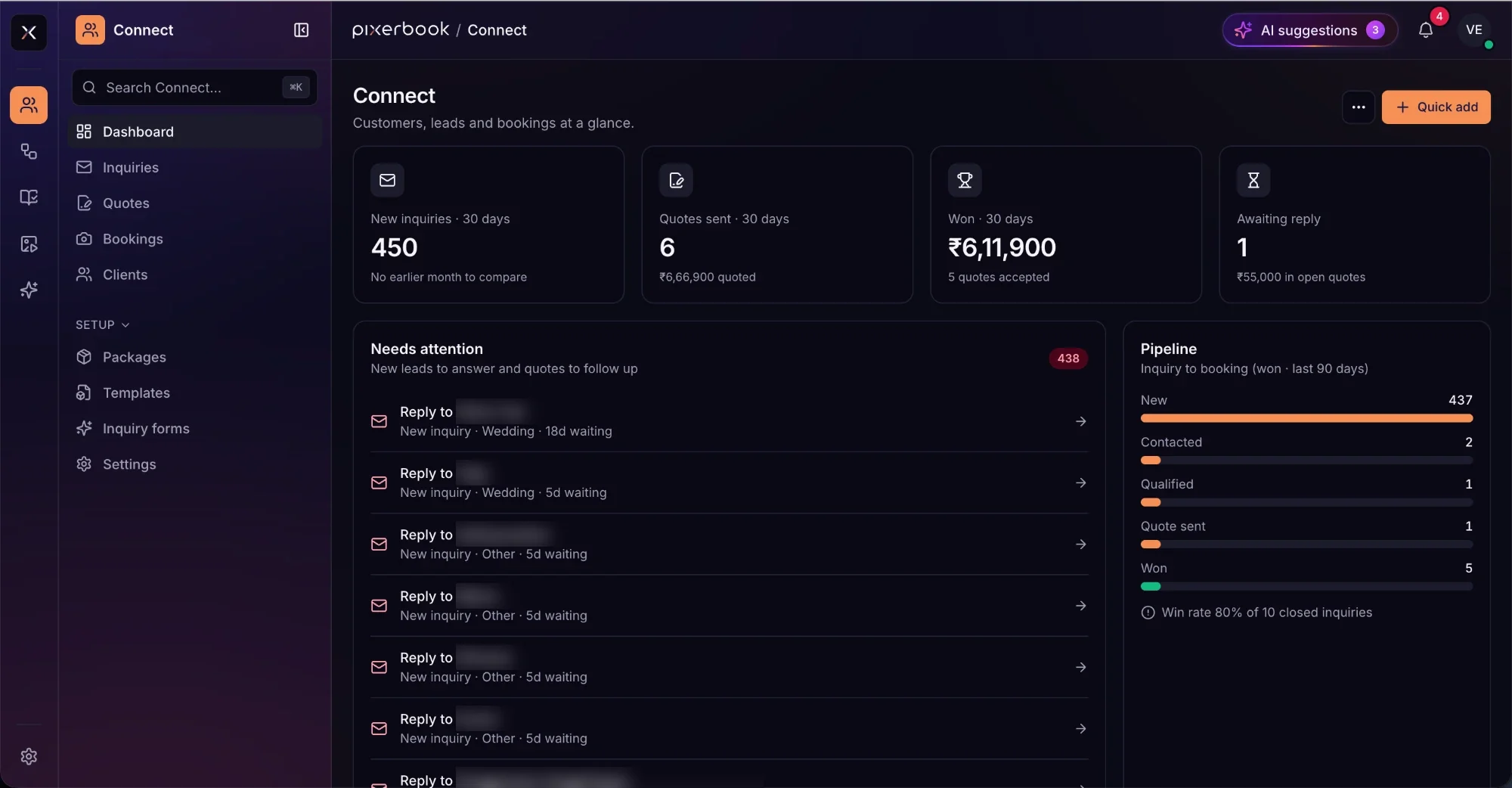
Connect is where the work comes in. Enquiries land with an owner, quotes are built from your own packages, and a won quote becomes a booking. The dashboard opens on who is waiting for an answer — not on a report you have to interpret.
- Inquiries, quotes, bookings and clients in one record
- A needs-attention list ordered by how long someone has waited
- Pipeline from new to won, with your actual win rate
- Packages, message templates and embeddable inquiry forms
02
Pixerbook Flow
Everything after the booking.
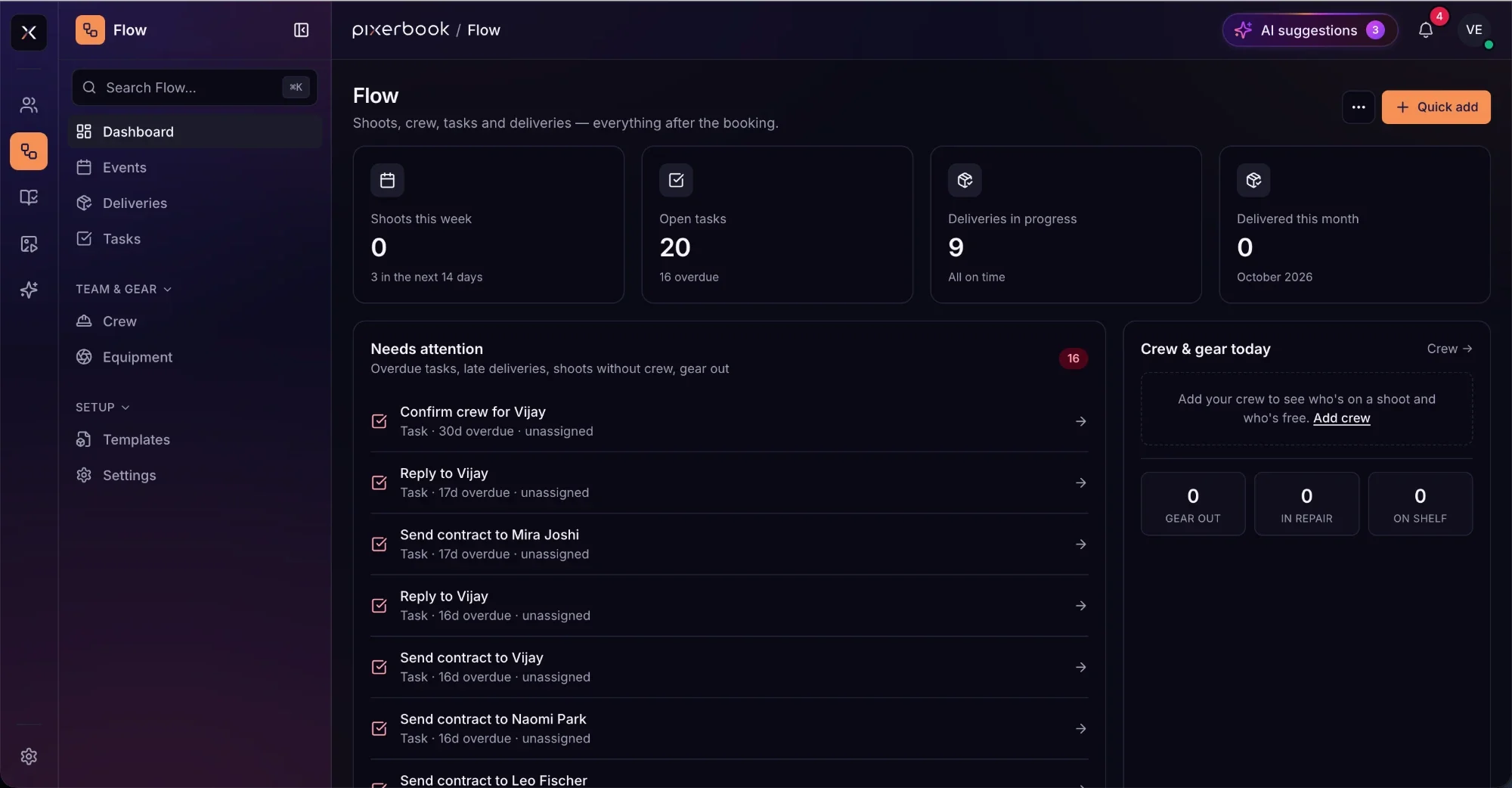
Once a date is booked, Flow runs it: events on a calendar, tasks with due dates, crew on each shoot and deliveries tracked to the day. Shoots without crew, overdue tasks and late deliveries surface before they turn into a phone call.
- Events, tasks and deliveries, with overdue flagged
- Crew scheduling — who is on a shoot and who is free
- Equipment: out, in repair, or on the shelf
- Task templates for the jobs every booking repeats
03
Pixerbook Finance
Every booking billed. Every rupee accounted for.
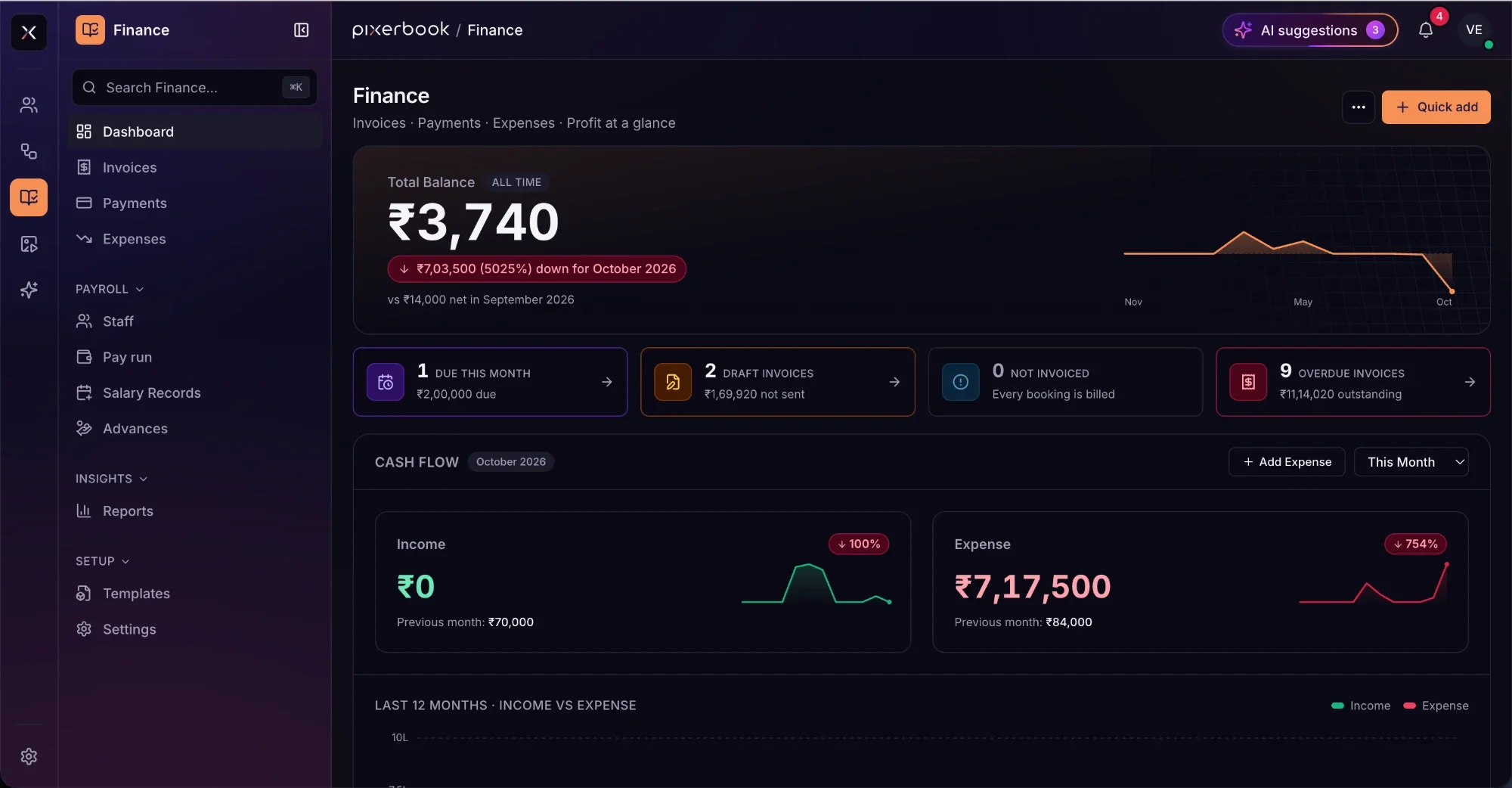
Finance closes the loop. Bookings become invoices, payments are recorded against them, and expenses sit beside income so the month’s cash flow is one screen. Payroll is in the same place: staff, pay runs, salary records and advances.
- Invoices, payments and expenses, with draft and overdue counts
- Flags any booking that has not been invoiced
- Monthly cash flow and twelve months of income against expense
- Payroll — staff, pay runs, salary records and advances
04
Pixerbook Media
Client picks and album approvals.
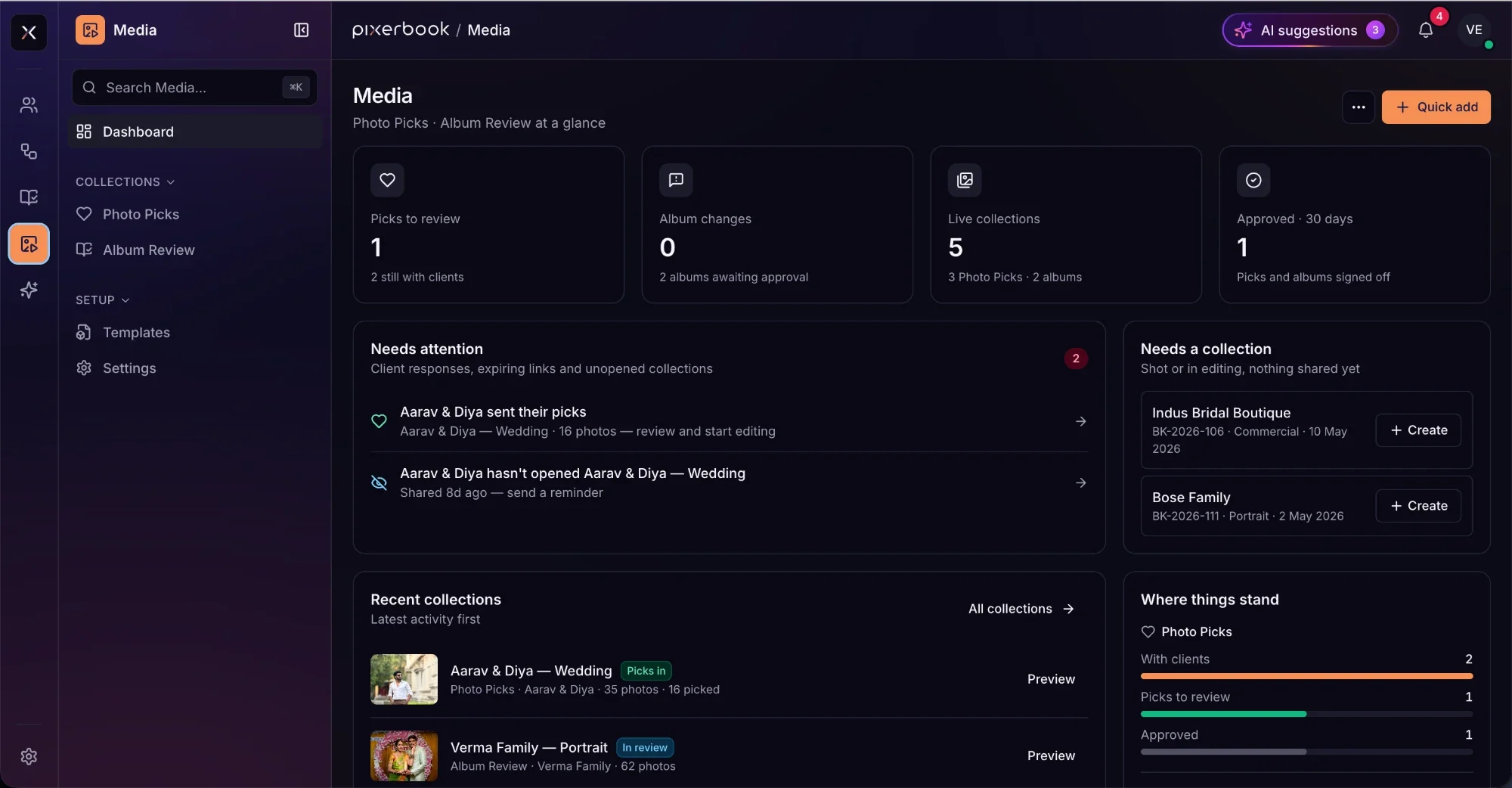
Media is the side your clients see. Share a Photo Picks collection and they choose favourites; share an album and they approve it or ask for changes. You see who has responded, who has not opened their link, and which shoots still have nothing shared.
- Photo Picks — client selection from a shared collection
- Album Review — approvals and change requests
- Reminders for unopened links and expiring collections
- Bookings that were shot but have no collection yet
05
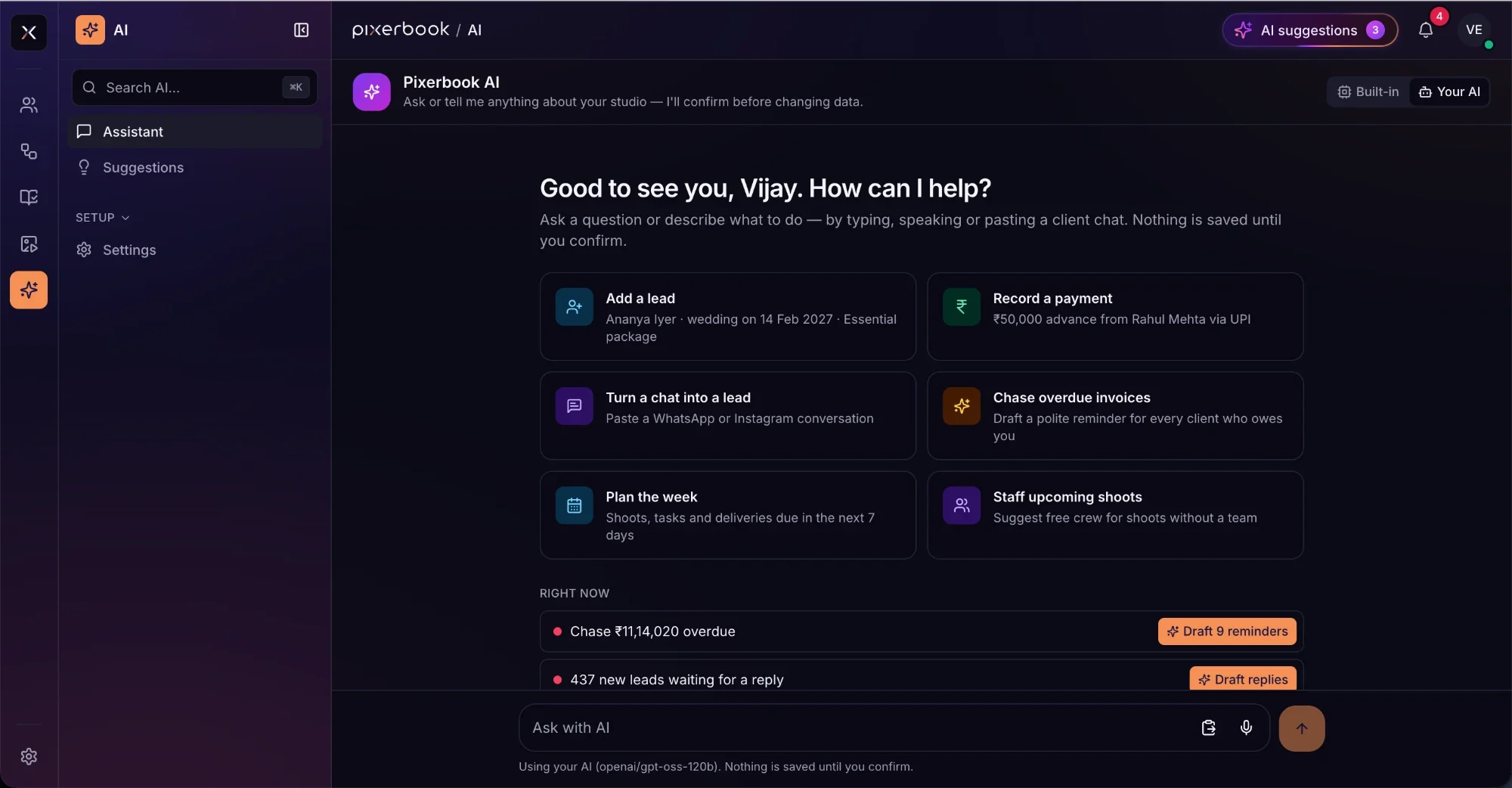
Pixerbook Agents
It drafts. You confirm.
Ask in plain language — typed, spoken, or by pasting a WhatsApp or Instagram conversation. Pixerbook Agents turn it into a lead, a payment or a plan for the week, and draft the replies and reminders you were about to write. Nothing is saved until you confirm it.
- Turn a pasted client chat into a lead
- Add a lead or record a payment from one sentence
- Draft reminders for every overdue invoice at once
- Plan the week, and suggest free crew for unstaffed shoots
- Use your studio from ChatGPT, Claude, Gemini, Cursor and other AI apps
06
Pixerbook MCP · Setup
Your studio, inside Claude and ChatGPT.
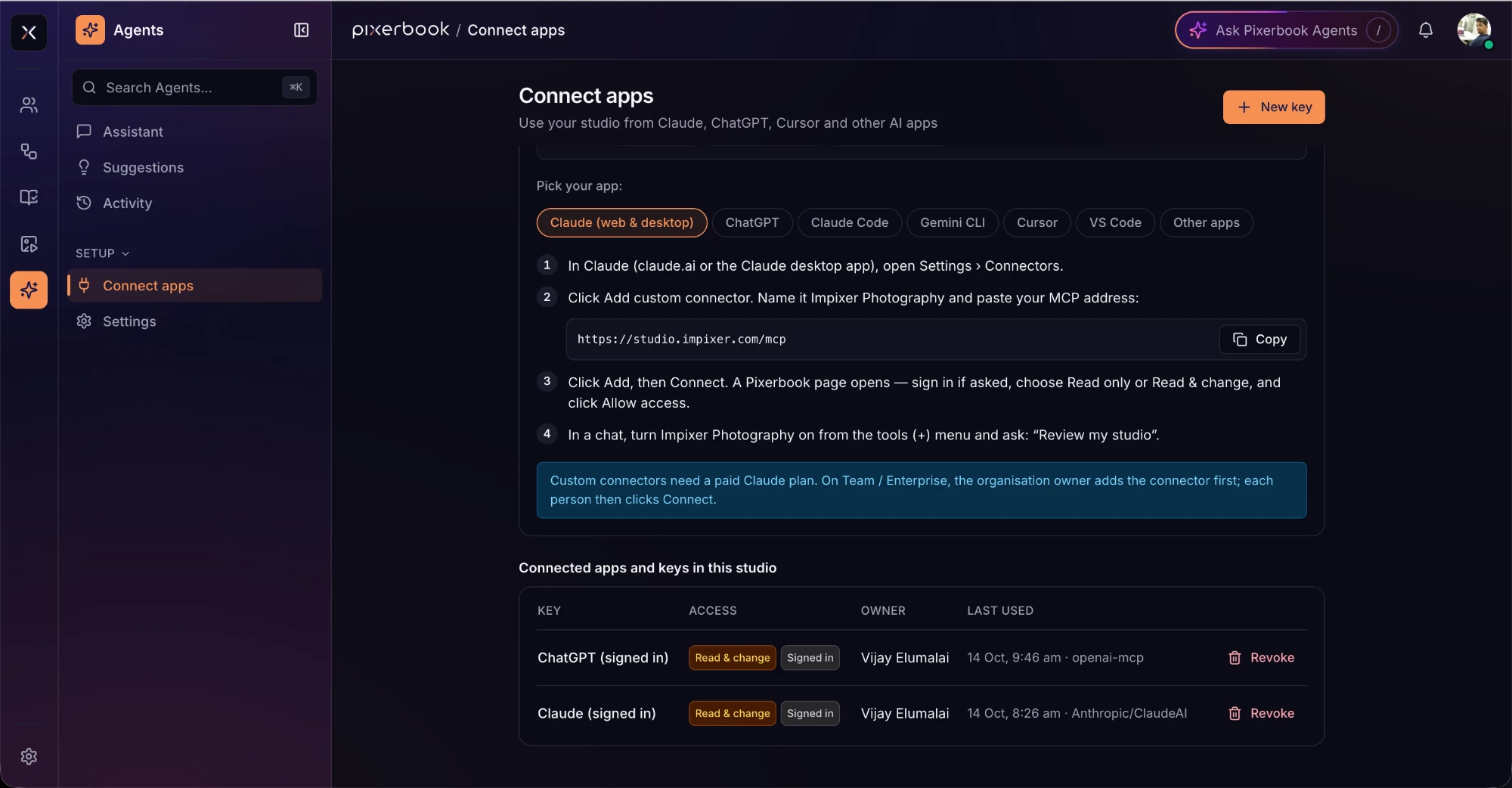
Pixerbook speaks MCP, the open standard AI apps use to reach real tools. Add your studio as a connector in ChatGPT, Claude, Gemini, Cursor, Claude Code or Gemini CLI, sign in once, and ask “Review my studio” from wherever you already work. The agent reads and acts on the same leads, bookings, crew, invoices and collections you see in Pixerbook.
- Works with ChatGPT, Claude, Gemini, Cursor, Claude Code, Gemini CLI and any MCP app
- Leads, quotes, bookings, clients, packages and templates
- Crew, equipment, tasks, deliveries, Photo Picks and Album Review
- Invoices, payments, expenses, staff and payroll — in rupees
- Choose Read only or Read & change for each app; revoke any key in one click
- The agent says what it will change and waits for a yes — every change is logged in Agents › Activity
Web app
Runs in a browser. Nothing to install.
Open it on any machine in the studio, including the one at the front desk and the laptop you took to the venue. Your team signs in; there is nothing to keep updated.
- Chrome, Safari, Edge and Firefox
- Phone, tablet and desktop
- Your subdomain or your own domain
- Updates arrive without you doing anything
Pricing
Platform, on its own.
One subscription for this product only. Nothing here is a bundle, and you are never charged for a product you have not asked for.
For a single studio with a small team.
Up to 5 users
- All five modules — Connect, Flow, Finance, Media, Agents
- Unlimited enquiries, bookings, events and clients
- Client Photo Picks and Album Review
- Your subdomain, white-labelled
- Migration from your spreadsheet included
For studios running more than one location or brand.
Unlimited users
- Everything in Studio
- Separate branches, one owner view
- Payroll across every branch
- Your own domain with automatic SSL
- Priority support with a named contact
Prices exclude GST/VAT, applied per your billing address. Monthly plans can be cancelled at any time. Ask about multi-branch studios.
Questions
Before you ask.
Is it one subscription for all five modules?
Yes. Connect, Flow, Finance, Media and Agents are one product with one subscription — you do not choose between them, and they share the same clients, bookings and events. Album Studio and Datasafe are separate desktop apps with their own subscriptions.
What happened to Pixerbook CRM and Proofing?
They are now part of the platform. CRM became Connect and Proofing became Media, and both now share their records with Flow and Finance instead of standing alone. Old links to either page bring you to the matching section here.
Will Pixerbook Agents change my data on its own?
No. They draft — a lead from a pasted chat, a payment record, a batch of invoice reminders — and show you what they intend to do. Nothing is saved until you confirm. You can use the built-in model or connect your own.
Can I use my studio from Claude or ChatGPT?
Yes. Pixerbook has an MCP server. In Agents › Connect apps, pick your app — ChatGPT, Claude, Gemini, Cursor, Claude Code, Gemini CLI or any other MCP app — copy your studio’s MCP address and add it as a connector. You sign in once, choose Read only or Read & change, and can revoke the key at any time. Every change an agent makes is logged in Agents › Activity.
It says Beta. What does that mean here?
Real studios run on it today, and the feature set is still moving. You are billed the normal rate and you get support, but expect the interface to change more often than it will in a year. If that is uncomfortable, wait for the Live badge.
Do my clients need an account to pick photos or review an album?
No. Media collections are shared as a link. Your client opens it in a browser on whatever phone or laptop they have — there is nothing to install and no password to forget.
Works with
Separate subscriptions.
One client record.
Platform is complete on its own. If you do add another product, they share the same client and event — so nothing is ever typed twice. You still buy them separately, and you can stop one without touching the other.
Request a demo
See it on your
own work.
Thirty minutes over Zoom, Meet or Teams — your choice. Send us one past event beforehand and we will set the demo up with your own photographs instead of a sample dataset.